

How to Sell on Ajio Commerce in 2026
Last verified against Ajio Commerce's own seller FAQ on 22 September 2026. This guide is built from Ajio's own published answers, not third-party estimates — where Ajio doesn't publish a figure, we say so instead of guessing.
Ajio Commerce is Reliance's marketplace arm for fashion and lifestyle sellers, sitting alongside Ajio's own retail business. Unlike some quick-commerce platforms that run invite-only vendor onboarding, Ajio Commerce runs a self-serve registration flow — but it's short on published numbers for fees and payout timing, so treat this guide as a starting checklist, not a final rate card.
Who Can Sell on Ajio Commerce
Ajio Commerce's own seller FAQ states plainly: "Everyone in India who sells genuine products and is authorized manufacturer or distributor of products is welcome." You don't need an existing website to apply.
Documents You'll Need
Per Ajio Commerce's FAQ, registration asks for:
- Phone number and email for your account.
- Company details — legal business name and structure.
- PAN card.
- Bank account and KYC documents for payment setup.
- A regular GSTIN — Ajio Commerce's FAQ specifically states it requires a regular GST registration, not the composition scheme. See our GST registration guide if you don't have one yet.
- CIN and TAN, where applicable to your business type.
- Brand Trademark Registration Certificate, if you're listing under your own brand.
Registration Process: Step by Step
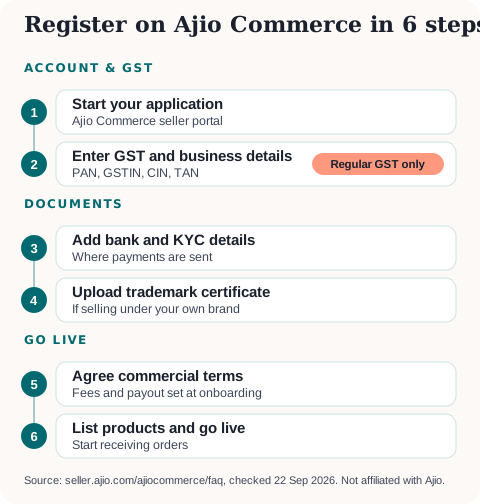
- Start your application at Ajio Commerce's seller registration portal.
- Enter your GST and business details, and upload the documents above.
- Add your bank account and KYC information.
- Submit your Brand Trademark Registration Certificate, if applicable.
- Agree your commercial terms — fees and payout schedule are set during onboarding, not published as a fixed rate card beforehand.
- List your catalogue and start selling once approved.
Ajio Commerce's public FAQ doesn't publish a fixed approval timeline, so budget for some back-and-forth on documents before you go live.
Compared to Flipkart or Amazon, Ajio Commerce's own public materials are noticeably thinner on process detail — there's no published category-wise commission table or fixed payout cycle to point to, so expect more of the specifics to surface only once you're in the onboarding conversation with Ajio Commerce's team.
Fees and Payout — What Ajio Commerce Actually Publishes
This is the one area where most guides for this platform overreach. Ajio Commerce's own FAQ says:
- Fees are "a combination of commission and operating expenses, as agreed during registration" — there's no fixed published commission percentage. It varies by category and brand.
- Payout goes to your registered bank account "as per the payment schedule decided during onboarding" — Ajio Commerce doesn't commit to a specific cycle (like Amazon's roughly 7-day or Flipkart's 3-day payment windows) on its public page.
If a third-party guide quotes you an exact commission percentage or payout day count for Ajio Commerce, treat it as unconfirmed until you see it in your own onboarding terms.
Ajio Commerce vs Flipkart and Amazon — Where Does It Fit?
Ajio Commerce is squarely a fashion-and-lifestyle play, competing more directly with Myntra than with the general-category breadth of Amazon or Flipkart. If your catalogue is apparel, footwear or accessories and you already have a Brand Trademark Registration Certificate, it's worth adding alongside a broader marketplace rather than as your only channel — Ajio Commerce's Reliance-backed distribution reaches a fashion-focused buyer base that overlaps with, but isn't identical to, Flipkart's or Amazon's fashion sections. Sellers without a registered brand can still apply, but Ajio Commerce's own FAQ frames itself around "authorized manufacturer or distributor" status, so unbranded or private-label sellers should expect closer scrutiny during onboarding.
Getting Started
If you don't have a GSTIN yet, get that sorted first since Ajio Commerce specifically requires the regular scheme — see our GST registration guide. Once you're registered, use the Marketplace Profit Calculator to model your margin once your actual commission terms are confirmed, and the GST Due Dates Calendar to keep your filing schedule on track.
Sources: Ajio Commerce Seller FAQ (seller.ajio.com/ajiocommerce/faq/), read 22 September 2026.
More platform guides: How to Sell on Myntra · How to Sell on Nykaa · Sell on Slikk? · How to Sell on Flipkart · How to Sell on JioMart · GST Registration for Sellers · File GST Returns with a CA
Ready to start or scale your online store?
Read our complete guide covering platform selection, GST registration, logistics, and payment gateways.
Newsletter
GST updates & guides, free.
Join sellers who get our weekly digest on GST compliance, e-commerce rules, and finance tips — no spam.
No spam. Unsubscribe anytime.