

How to Become a Flipkart Seller in 2026
Last verified against Flipkart's seller pages on 21 September 2026. Fees and steps change, so treat Seller Hub as the final word.
Flipkart is one of India's two biggest marketplaces. Registration is free, and the fee rules have shifted in sellers' favour: 0% commission on lower-priced products and on all of Fashion. Here's the registration process and what to check before you commit.
Eligibility and Documents Required
To register as a Flipkart seller, you'll need:
- A GSTIN. Flipkart asks for GST details at registration and says GST is mandatory for most categories. Since 1 October 2023, small sellers of goods who supply within a single state and stay under the turnover threshold can be exempt from GST registration (Notification 34/2023–Central Tax), but each marketplace sets its own onboarding rules, so check Flipkart's requirement for your category. See our GST registration guide if you need a GSTIN.
- Scanned copies of your GST certificate, PAN card and proof of address. Flipkart cross-checks them against government records.
- Bank account details for payments.
- A pickup address where Flipkart's logistics partner can collect inventory.
- At least one product ready to list, with clear images and the right category.
Registration Process: Step by Step
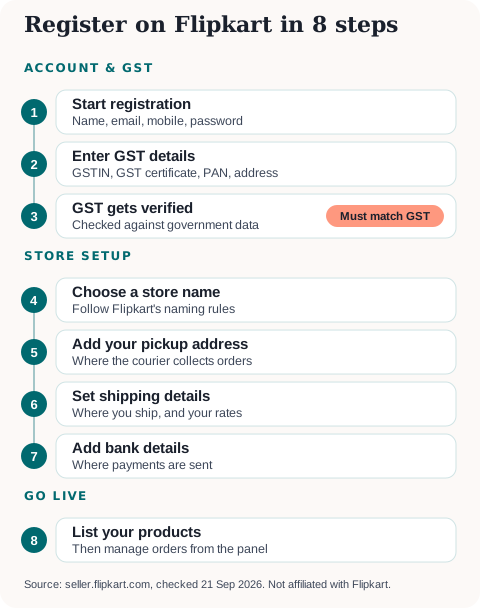
- Start registration at seller.flipkart.com: name, email, mobile number and a password.
- Enter your GST details: GSTIN, legal business name and business type, and upload the documents above.
- Wait for GST verification. Flipkart checks your GSTIN against government databases. It doesn't publish a fixed time, so make sure every detail matches your GST record.
- Choose a store name that follows Flipkart's naming guidelines.
- Add your pickup address. Accuracy matters, since it's where the logistics partner is sent for every order.
- Set your shipping details: where you'll ship and your shipping rates.
- Add bank details for payments.
- List your products and start managing orders from the dashboard.
Commission, Fees, and Payouts
Registration is free. Fees are charged per sale, and Flipkart's public fees page says:
- 0% commission on all products priced below ₹1,000, in every category.
- 0% commission across the entire Fashion category, even above ₹1,000.
- Other categories carry a category-wise commission.
- A fixed (closing) fee that depends on your seller tier: Platinum, Gold, Silver or Bronze, with Bronze paying ₹10 more than the base rate.
- A collection fee and shipping fee where applicable, and the fees depend on whether you use Fulfilment by Flipkart (Flipkart packs and ships) or ship yourself.
Your exact rate card appears in the seller dashboard once you create an account, and Flipkart says rates are subject to change, so check it before finalising prices.
Payment timing: Flipkart releases payment after dispatch, starting when your product is picked up, and says you can receive it in as fast as 3 days. The schedule depends on your seller tier. Flipkart deducts 0.5% TCS under GST and TDS under Section 194O, both reclaimable. See our guides on claiming your TCS refund and claiming TDS credit in your ITR.
Flipkart Quick/Minutes — What Sellers Need to Know
Flipkart's quick-commerce push — branded as Flipkart Quick and Flipkart Minutes — competes directly with Blinkit, Zepto, and Swiggy Instamart for 10-30 minute delivery. This isn't the same fulfilment model as standard Flipkart selling:
- It typically requires darkstore-style local fulfilment rather than a central warehouse dispatch model, since the delivery SLA is measured in minutes, not days.
- Eligibility is not automatic for existing sellers, as we understand it — Flipkart's public seller pages don't detail Quick/Minutes onboarding, so confirm the current process in Seller Hub.
- It's most relevant for FMCG, grocery, personal care, and small electronics accessories categories, where quick-commerce demand is concentrated.
If your product category and operational setup fit quick-commerce fulfilment, it's worth applying — the category currently has less seller competition than standard marketplace listings. If you're a standard product seller without darkstore capability, the regular Flipkart seller programme covered above remains the right starting point.
Flipkart vs Amazon vs Meesho — Where Should You Start?
Flipkart's core strength is its India-first buyer base and broad category depth, making it a strong second (or first) marketplace for sellers targeting Tier 2/3 city demand alongside metro buyers. If you're deciding where to begin:
- Choose Flipkart if your category has strong India-wide demand and you want a marketplace with deep catalogue tools and, increasingly, quick-commerce reach via Quick/Minutes.
- Choose Amazon if your product suits FBA-style fulfilment and you want access to Amazon's Prime buyer base and stronger cross-border/export tooling.
- Choose Meesho if you're starting with a lower budget, want the lowest-friction reseller-driven demand, or are targeting value/budget price points.
Most sellers who scale meaningfully end up on more than one of these — see our pillar guide to selling on multiple marketplaces for the sequencing and operational setup that works.
Growing Beyond Flipkart
Most sellers eventually list across multiple marketplaces once a product proves demand. Our Guide to Selling Online in India covers platform comparisons, GST compliance, logistics partners, and payment gateway setup. Once you're selling, the Flipkart Seller GST Guide explains every deduction in a Flipkart settlement and the monthly GST routine. Use the Flipkart GST Calculator to see your net payout on a Flipkart order, or the Marketplace Profit Calculator to compare your actual margin after commission, shipping, and GST across Flipkart, Amazon, and Meesho before deciding where to focus inventory.
Sources: Flipkart Seller Hub fees and commission and seller registration guide (published 19 November 2024), both read 21 September 2026. Flipkart Quick/Minutes details are not covered by these pages.
More platform guides: How to Sell on Amazon India · How to Become a Meesho Seller · How to Sell on Shopsy · How to Sell on Flipkart Minutes · How to Sell on Ajio Commerce · GST Registration for Sellers · File GST Returns with a CA
Ready to start or scale your online store?
Read our complete guide covering platform selection, GST registration, logistics, and payment gateways.
Newsletter
GST updates & guides, free.
Join sellers who get our weekly digest on GST compliance, e-commerce rules, and finance tips — no spam.
No spam. Unsubscribe anytime.