

How to Sell on Nykaa in 2026
Last verified 22 September 2026. Nykaa's own seller landing page is marketing copy, not a process document, so this guide is upfront about which facts are confirmed and which come from third-party seller-onboarding guides.
Nykaa is India's leading beauty and personal-care marketplace, also running a separate Nykaa Fashion vertical. Like Myntra, registration isn't instant self-serve — brands apply and Nykaa reviews them before approval, and beauty/cosmetics sellers face an extra layer of product-safety documentation that general marketplaces don't ask for.
Who Nykaa Works With
Nykaa's own landing page (nykaa.com/sellonnykaa) confirms a seller programme exists and has a "get started" application flow, but doesn't publish eligibility criteria on the page itself. Third-party onboarding guides describe an approval step similar to Myntra's — Nykaa reviews your brand before activating your account, rather than opening listing to anyone instantly.
Documents You'll Likely Need
Based on third-party seller guides (not confirmed on an official Nykaa page):
- GST certificate — see our GST registration guide if you need a GSTIN.
- PAN card.
- Bank account details, often with a cancelled cheque.
- Trademark certificate or brand authorization letter, if you're not the brand owner.
- Business registration documents — Certificate of Incorporation, MOA/AOA, or partnership deed, depending on your business structure.
- Product-safety documentation for cosmetics and skincare — several guides mention a COS-8 certificate or manufacturing license specifically for this category. This is a genuinely useful thing to flag early since it's not something a general-marketplace seller (Amazon, Flipkart) would have prepared already, but confirm the exact requirement with Nykaa for your specific product type rather than assuming COS-8 applies to everything you sell.
Registration Process: What We Can Confirm
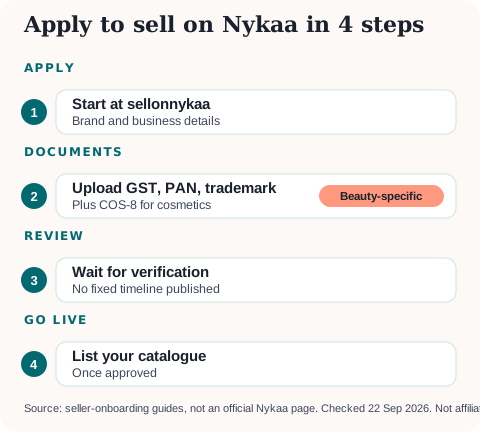
- Apply through Nykaa's seller portal, starting from the "get started" flow on nykaa.com/sellonnykaa.
- Submit your brand and business details, GSTIN and PAN.
- Upload supporting documents, including the cosmetics-specific ones above if relevant.
- Wait for verification. Nykaa doesn't publish a fixed approval timeline on a page we could confirm.
- List your catalogue once approved.
Nykaa Fashion has a separate vendor-support contact (vendorsupport.nykaa.com) distinct from the beauty marketplace — if you're selling apparel rather than beauty products, confirm which programme you're actually applying to.
Commission — What's Confirmed vs Estimated
No official Nykaa commission rate card was found. Third-party guides quote category ranges (roughly 10-35%, with beauty categories generally quoted lower than Nykaa Fashion), but the numbers aren't consistent between sources and none cite a Nykaa document. Use your own approved seller terms to model margin, not a blog's estimate.
Nykaa vs a General Marketplace
Nykaa's specialisation is its strength for beauty brands: shoppers arrive already looking for cosmetics and skincare, rather than browsing a general catalogue. That specialisation is also why the extra compliance documentation exists — safety certification requirements for cosmetics aren't something Amazon or Flipkart ask for at the same depth. If your catalogue is beauty-only, Nykaa is worth prioritising alongside a general marketplace rather than instead of one, since the two audiences overlap but aren't identical.
Getting Started
If you don't have a GSTIN yet, get that in place first — see our GST registration guide. Once approved, use the Marketplace Profit Calculator to model your actual Nykaa margin, and the GST Due Dates Calendar to stay on top of filings once orders start.
Sources: nykaa.com/sellonnykaa (loaded, marketing-only), checked 22 September 2026. Document and commission claims above are attributed to third-party seller-onboarding guides, not an official Nykaa source.
More platform guides: How to Sell on Myntra · How to Sell on Ajio Commerce · GST Registration for Sellers · File GST Returns with a CA
Ready to start or scale your online store?
Read our complete guide covering platform selection, GST registration, logistics, and payment gateways.
Newsletter
GST updates & guides, free.
Join sellers who get our weekly digest on GST compliance, e-commerce rules, and finance tips — no spam.
No spam. Unsubscribe anytime.